


Brief
Read PDFs, Word files, email, spreadsheets, slides and images in one pane. Links inside PDFs still work; Lexware markup stays out of the original files.

The litigation workspace for barristers
Import your brief. Connect the evidence. Build your case.
Documents, chronology and working papers, in one local workspace.

Import a zipped download, an existing folder of documents, or a compiled PDF court book — read-only, in minutes, your originals never touched. Then, as the matter grows, documents that arrive after the brief — an emailed PDF, a forwarded .msg — triage in through the Intray.
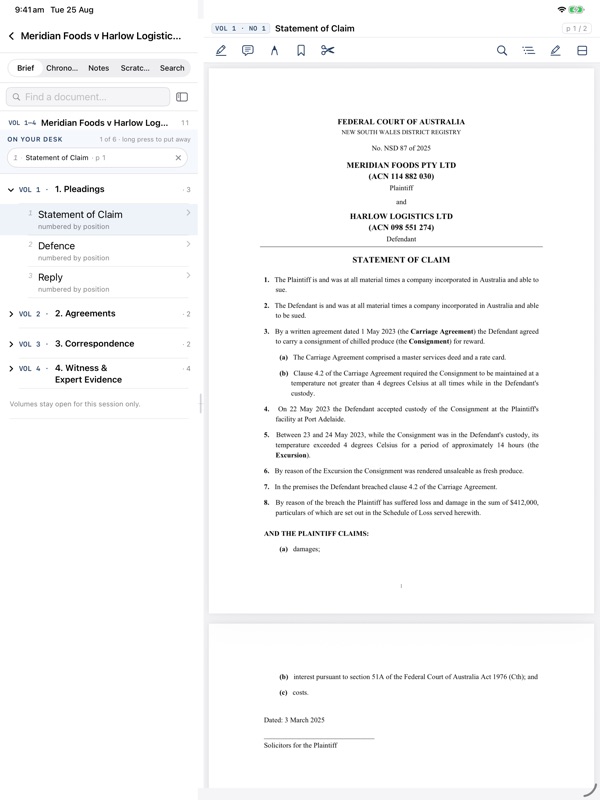
Navigate the brief like a ring binder, search every word in an instant, and highlight and annotate as you read — at your computer or in Lexware Companion on your iPad.
Extract events from your documents and add them to a chronology. Move between a timeline, calendar or sortable table, filtered by party, issue or tag, with every event linked back to its source.
Use as little or as much AI as you choose — Lexware is built to put you in control. Use the app without any AI, or integrate deeply with local and cloud AI services, taking advantage of inbuilt pseudonymisation of data. The choice is yours, and you can configure different options for different matters.
Read documents side by side, mark key pages with sticky Quick Tabs, and add highlights or comments as you go. “On your desk” keeps open documents ready to resume where you left off.
Turn your documents into a source-linked chronology. Review events, follow the story and go straight back to the evidence.
Draft submissions, witness outlines and advice with automatic legal numbering and live citations. Preview a source without losing your place.
Lexware keeps the material you receive, the record you need to master and the work you create in clear groups — distinct, but connected throughout the matter.
From the delivered brief to a court-ready bundle.
Read PDFs, Word files, email, spreadsheets, slides and images in one pane. Links inside PDFs still work; Lexware markup stays out of the original files.
Extract, review and compare source-linked events in a timeline, calendar or sortable table.
Assemble a court book for each hearing, export one merged PDF, or hand it to LiquidText or PDF Expert.
The filed, exchanged and spoken record, kept distinct.
The pleadings dispute matrix — a Lexware signature no comparable tool offers. Work through the claim, defence and reply paragraph by paragraph, every allegation admitted, denied or not admitted, each linked back to its filed source.
See the matter's inbox and outbox by date; filter by people or domains to follow an exchange.
Collect cases, legislation, secondary material and pinpoints; detect Australian citations, fill court and year from a pasted citation, read them in place, open AustLII, marshal them for and against each argument on a board, and export a list or bundle index.
Move by day and witness, search for patterns, and carry colour-coded highlights across the hearing record.
Linked analysis and action built from the record.
Draft structured work with live citations, source previews and backlinks wherever the evidence is used.
Press S on a selected passage to make a quote card with your note and a backlink, then arrange cards on a freeform canvas.
Keep the matter's to-dos beside the document or event they concern.
Optional help, only where you want it.
Use Ask for a focused drafting or analysis task, then follow its progress and result in Activity. Off-device runs require matter-by-matter consent.
Build a structured matter briefing from the records and documents you choose. Refresh it as the matter changes; earlier briefings are retained.
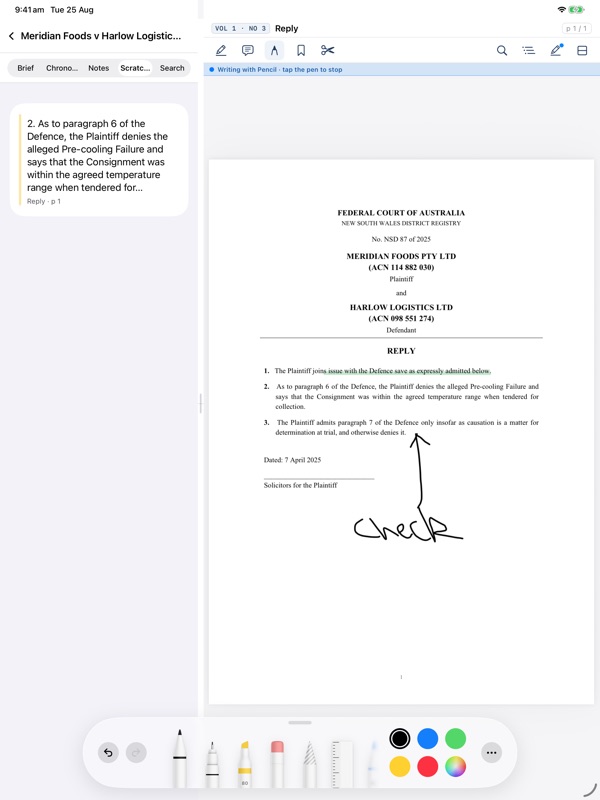
Read the brief, search the matter and keep the chronology beside the papers. Apple Pencil ink, highlights, comments and sticky tabs sync back to Lexware on the desktop. You can also read Notes and the Scratchpad, and add a selected passage to the Scratchpad as you work.
Lexware Companion connects directly to Lexware over the same local network or the computer's hotspot. Your Mac or Windows PC must remain awake with Lexware running. There is no cloud relay or Lexware matter account.
Requires iPadOS 18 or later and an active Lexware Pro subscription or Pro trial on Mac or Windows.
Lexware does not receive or store your brief, extracted text, chronology, pleadings, notes or other matter work. Off-device AI and Lexware Companion access are separate choices, both off until you enable them.
Built-in rule-based date extraction runs locally without AI or cloud. Optional use of Ollama local model (separate installation required). Off-device AI is opt-in, per matter and you choose when to use it.
There is no Lexware account for your matters, no hosted matter copy and no usage analytics. Lexware cannot see what you open or how you work.
Your brief is read-only — never moved, renamed or rewritten. The brief you were delivered stays exactly as it arrived.
Built in Australia for Australian barristers. Lexware does not receive or store your matter content. How Lexware handles your data → · The security architecture → · Privacy policy →
Stewart Webster KCFounder, Lexware
Questions
Not by default. Matter content can go to an off-device AI provider you enable for that matter, or directly to Lexware Companion over the local network or the computer's hotspot. Lexware does not receive or relay it.
Yes. The desktop workspace and built-in rule-based date extraction run without an internet connection. Companion's connection to the matter does not use a cloud relay, but it needs a local network or the computer's hotspot. Claude, ChatGPT and Ollama Cloud require internet access. A remote Ollama endpoint requires a connection to that endpoint; local Ollama can run offline. An activated paid licence is cached for offline use, with a 14-day grace window.
PDFs, Word, email — Outlook .msg and standard .eml — Excel, PowerPoint and images, all in one pane. Excel can also import directly as a chronology.
Lexware runs on Apple Silicon Macs and Windows 10 or 11, with Windows installers for x64 and arm64. Lexware Companion runs on iPadOS 18 or later and pairs with the desktop app. Intel Macs are not supported.
Start with a two-month free trial of Pro. Verify your email to download; no card is required. After the trial, Free costs nothing, Starter is A$19 a month + GST for up to five active matters, and Pro is A$79 a month + GST with unlimited matters, Assist and the iPad companion. Nothing is charged unless you choose to subscribe. See all plans and annual offers.
Start with the full Pro workspace for two months. No card required. Afterwards, keep reading on Free or choose Starter or Pro.
Mac (Apple Silicon) and Windows 10 or 11 · Verify your email to download · No card required